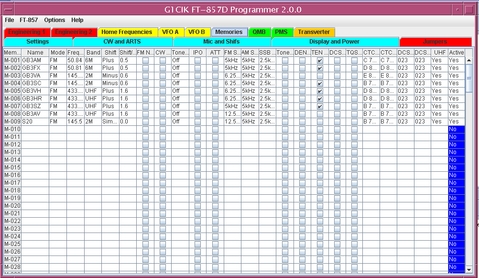
This software reads and writes directly to the EEPROM so there is no need to put the radio into clone mode. This does have the disadvantage of being slower than clone mode taking around 3 minutes to update all 200 memories. This is due to the protocol needed.
The idea originally was to create a CSV file containing all the memories that can be directly amended using my favourite editor, vi, but in the end I created a simple interface, which has now grown to include most of the operational parameter.
There is some basic checking of the entered values but nothing to excessive. I have included drop down menus for all the selections except the frequency and name. Selecting the memory number and pressing return will set some default values.
Before you use this software make sure you have a copy of your radio’s configuration parameters, not just the normal user ones but also those on the engineering menu. Press and hold A, B & C keys while turning on the radio and make a note of all 74 entries, 57 for the FT-817ND just in case...
Sorry download is not currently available, watch this space, but don't hold your breath...
You will need:-
JRE 6
The javax.comm package from http://www.oracle.com/technetwork/java/index-jsp-141752.html
The swingx package from http://swingx.java.net/
The libraries are also available in the Downloads area, which is available after login.
A sfs is also available which has been tested with Slacko Puppy Linux 5.5. This requires jre 1.6.0.24 which is also available as a sfs from the library section of the memory manager download pages.


